VIEW ALL GALLERY LIGHTS

Wednesday, September 23, 2009

Releasing a new blogspot template

I made a little hack in this template ,so it can show thumbnail in sub-news section . I also upload necessary pictures to imageshack.us ,so bandwidth is not limited . I hope this helpful to you 
You can download new version here
Download


I believe that blogspot can do everything that wordpress can . Yes ,of course ,it need time to make the function available such as readmore ,recent post ,recent comment ,show posts in their categories . But anyway ,nothing is impossible .

Here is my latest blogspot template . The layout from WPNewspaper template ,designed by gabfirethemes .Base on this web layout ,I added code for make it available in Blogspot .

It's a completely magazine template . Like no others blogspot template in magazine style only arrange their post in column like newspaper ,in this template ,Posts is showed as its wordpress template version .

Simplex Newspaper screenshot

Live Demo | Download

Main Features:

* Automatic Thumbnails on posts
* Automatic Post Summarize
* Showed newest posts in each categories
* Ads block ready
* Change images and logo easily
* Youtube Video embedding Integrated
* Fully SEO Optimized
* Added a Photo gallery
* Thumbnails on Recent Posts in Sidebar
* Integrated Search box
* Beautiful top Navigation bar
* Cross-browser compatible
* and many more....

How to install Simplex Newspaper template


1,Download template and extract it .You get one xml file and one folder contain images .

2,Upload all images in folder to a photo hosting service such as photobucket .

3,Open the xml file , Change all links : http://i604.photobucket.com/albums/tt130/metalner/simplexnews/... to the link of your images on hosting service .

4,Change all links :http://nhamngahanh.blogspot.com to your own blog address .Change link of each category in topbar,menubar,footer and change the subscribe address to yours.

5,if you want to change image or logo to yours ,just make your own logo or image and put the link in template file .

6,I noted the meaning of some variables in xml file ,so if you want to do more ,or tweak this template ,you can change these variables . Whatever change is up to your demand ,so I don't mention it here . You can read the xml file and modify it or contact me in comment form .

7,Open the blogspot dashboard . Come to Layout tab ,continue to Edit HTML ,and upload the xml file to blogspot .

How to use :

1. Breaking news section is a place where headline is posted . I make this for owner of magazine can updated news in minute . To post in Breaking news section ,just named label for your post "breakingnews"

2. Section in right-hand of breaking news for news . To show your post in this section ,just added label for your post "news"

3.To show image on gallery ,you added image in your post (one image is allowed ,do not insert more than one image in a post because gallery only show the first image in each post ) and named label for the post "gallery".

4.Subnews section is under gallery section ,it show the newest posts in each label . To change the label and post showed in each label ,open the xml file and find out code in this picture
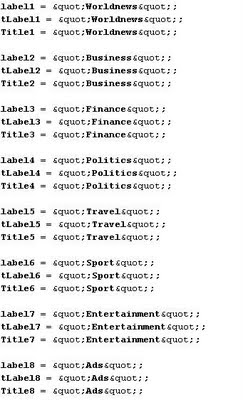
label position

Change these to labels you need

It's my second template . I don't know how to write using and setup instruction to fit your needs . So if you have any trouble or error in using ,just comment here .

adding visual lightbox to your blogspot

I have another post for lightbox effect ,with really working script . Check it out here

lightbox is a simple effect for your blog . Here is how to apply this effect to your blogspot .


Live demo in this blog


1.-Download lightbox 2.0 script in here .
-After extracting the zip file ,you got three folders :css ,images,and js .
-Upload image to a image hosting service .
-Open css file ,change the url of prevlabel.gif and nextlabel.gif to the url of images in hosting service .And do the same with js file , change the url of loading.gif and closelabel.gif
- When you finish changing image url to right location ,upload css and js file to a host . In my blog ,I uploaded all files to google pages .
2. Open your blogspot dashboard . Go to layout tab ,continue to Edit HTML . In HTML template ,add this code after ]]></b:skin> :

<script type="text/javascript" src="js/prototype.js"></script>
<script type="text/javascript" src="js/scriptaculous.js?load=effects,builder"></script>
<script type="text/javascript" src="js/lightbox.js"></script>
<link rel="stylesheet" href="css/lightbox.css" type="text/css" media="screen" />

change the address to where you host files .
3. You finish set up for lightbox effect . Each time you want to show your image with lightbox effect , just add a rel="lightbox" attribute to any link tag to activate the lightbox. For example:
<a href="images/image-1.jpg" rel="lightbox" title="my caption">image #1</a>
If you have a set of related images that you would like to group,
follow step one but additionally include a group name between square
brackets in the rel attribute. For example:

<a href="images/image-1.jpg" rel="lightbox[roadtrip]">image #1</a>
<a href="images/image-2.jpg" rel="lightbox[roadtrip]">image #2</a>
<a href="images/image-3.jpg" rel="lightbox[roadtrip]">image #3</a>
here is template integrated lightbox effect : Download


Saturday, September 19, 2009

adding searchbox to your blogspot template

  this is the screenshot of  Search Form Widget


Open your template ,and insert this code where you want searchbox appear :

<form id='searchThis' action='search' method='get'><input id='searchBox' name='q' type='text'> <input id='searchButton' value='Go' type='submit'></form>

Another way easier . You can insert a Html/javascript widget in your site and paste the code above in the content of widget .
You can customize how searchbox look by adding some CSS 
Done !

some cool widgets for your blogger

there're some widget for blogger I think very useful .It expand blogger functions ,and help you connect your readers . They are all free . Check it out :

AddThis : Sharethis or Addthis social bookmarking Sharethis social bookmarking buttonbuttons makes it easy for your visitors to share your content with others. It is a good way to increase your link popularity and publicity. Instead of inserting each social bookmark buttons in your blogspot template ,you just insert a code of addthis widget and your reader can share your post with more than 60 social bookmark networks .

whos.amung.us : This service help blogger track visitor in realtime . It display the number of visitor currently on your site and what pages they are reading .online visitor tracking widget

Web2PDF Online : I integrated this widget in my templates . This widget is so cool .It convert the content to pdf format in minutes ,and the reader can easily download the content Save Page as PDFto their computer or print it out without any troubles .


cbox
Cbox: Cbox or Chatbox is a chat widget . You can embed it in your website easily . It's another way to interact with your readers beside comment system

Google Translate: This widget lets your non-English speakingGoogle translate widget
visitors to quickly translate your webpage in their native
language with just a single click. I find out that this widget can increase the traffic of a site . I searched some word in my native language Vietnamese and I see some website ,but when I enter these site ,I realized that they are not sites in Vietnamese ,they are sites in English but installed google translate . Google translated these sites and listed in search result as Vietnamese sites . By this way ,you can attract more traffic from visitor who don't speak your site language .

How many widget did you add to your blogspot ? and do you have another interesting widgets ? tell me in comment form below .

adding favicon to your blog on blogspot

Favicon is a small image showed on the left of address bar , stand for "favorite icon" .
Favicon allow webmasters to promote their site ,and reflect the look and feel of the blog or a representation of a company logo . You can see the favicon of SimplexDesign blog is a "S" .

favicon


To make a favicon ,at first ,you need an icon . Icon can be created by some programs such as photoshop ,pain.net ,iconedit and irfanview .

If you don't have any of them ,you can access http://favicon.cc or http://www.degraeve.com/favicon/ to creating an icon online ,or you can enter http://www.faviconsr.us/and choose one for yourself from their collections . After getting icon , upload it to an image hosting .

You can use google pages for hosting your icon .

Open your template and adding these line after the <head> tag :
<link href='http://youraccount.googlepages.com/favicon.ico' rel='shortcut icon'/>
<link href='http://youraccount.googlepages.com/favicon.ico' rel='icon'/>
remember to change the links in the code above to your file links

You can use any image hosting service for hosting favicon . There are many service that automatically convert your image to .ico format and host it for you . Just make a search on Google .

Open your template in any word editor and add this line right after  <head>

<link href='http://your image url/favicon.ico' rel='icon' type='image/vnd.microsoft.icon' />


Change 'your image url' to your favicon url . Save your template ,and you are done .

best stock photo sites for you

Stock Photo sites are the place where the bloggers and websites owners search for good pictures for their articles or for their template design.

There are a lot of paid stock photo sites, and a lot of free sites where you can find really/enough good stock photos. You know that most people are using free stock photo sites, but there are and a few who use paid sites. That means that if you want you can give some $ and you will have really unique pictures for your articles, but the free stock photos are not so bad, too.


StockVault – We love to share photos


Free Royalty Free Photos, Pictures, Images and Stock Photography


OpenPhoto.net

http://l.yimg.com/g/images/logo_home.png.v2
Flickr – Photo Sharing


Stock.XCHNG,the leading FREE stock photo site!


FREEIMAGES.CO.UK- Free Stock Photos


Image * After – currently 21579 free textures and images available


Free Large Photos


NOAA Photo Library

pdphoto
PD Photo – Free Photos And Pictures


Pictures free Download

There are a lot of more stock photo sites, but i think that these are the best and with enough good photos. If you know other good sites, just post here and i will add it to this collection :)

how to resize images in your blogger post ?

helpful tip
 In your post ,if image's size larger than layout ,it will be overfloat ,and break the design of your blog .
To fix this problem ,we can set a maximum size for images in your post  .If image size larger than this value ,image will be resize automatically ,but still keep proportion .


How to do it ?

Just as this code in style section of your template . Find the line <b:skin><![CDATA[/* and insert this code right after :

img {
max-width: 480px;
width: expression(this.width > 480 ? 480: true);
border: none;
text-align: center;
}

in the code above ,480 is the maximum width of images . Set this value depend on your need .
You can change width to height to set the max-height of images .